Printable graph paper

Graph paper generator

Choose your grid and paper size, preview your sheet, and download a free PDF.

How to use printable graph paper

Make your sheet

Grid layout
Paper
Orientation
Customize in editor

Free PDF · No sign-up needed

Line color & weight
Line color
Line weight

Your paper preview

1/4 Inch Graph Paper

US classroom square grid with four squares per inch.

Letter · Portrait
papergens.com
Letter (8.5 × 11 in)Print at Actual size (100%)

How to use printable graph paper

A consistent grid makes plots and measured sketches easier to read. Choose the grid for the task, then decide what one square means before drawing.

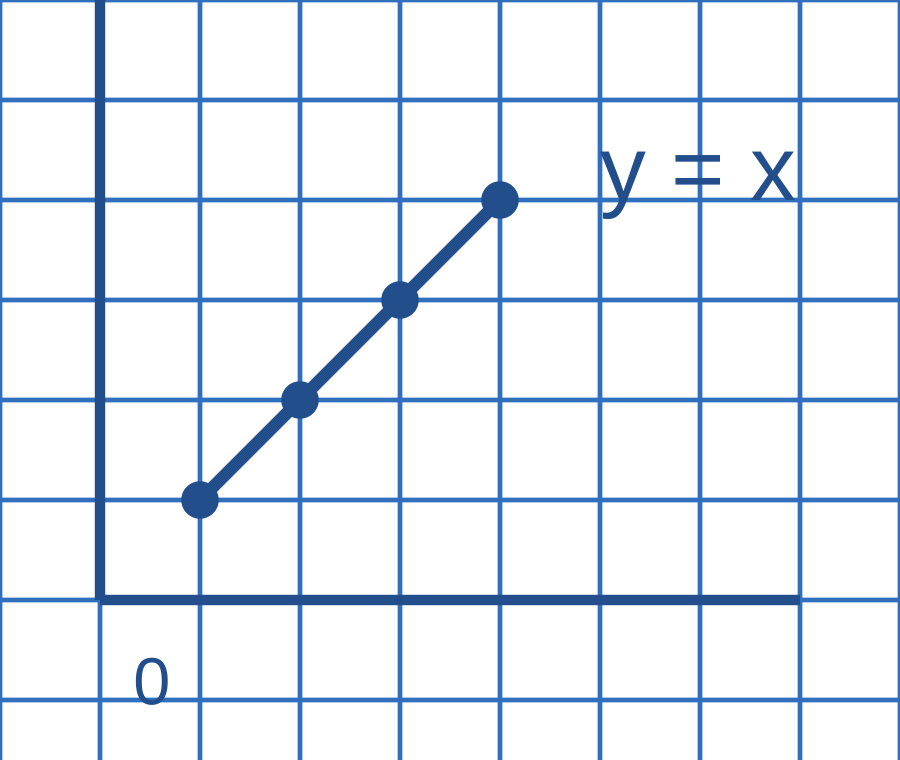
Graph paper with pencil-style axes and four plotted points on y equals x
Example in use. Here each square represents one unit; equal horizontal and vertical steps make a straight line.This is a usage illustration. Customize the sheet above before downloading.
  1. Choose the grid and paper size

    Use a square grid for ordinary plots, coordinate paper for labeled axes or a specialty grid for technical sketches.

  2. Set a scale and draw

    Label the axes and choose units. Mark points at grid intersections before connecting them or drawing a measured outline.

  3. Check the printed spacing

    Print at 100% when the physical square size matters. Measure several squares together to catch printer scaling.

Try this. A 1 cm grid only measures 1 cm on paper when the PDF prints at actual size. Screen previews can be scaled.

Sketch on graph paper online

Need a 10 × 10 grid with exactly 100 squares?

A fixed cell count is different from fixed spacing. Use the dedicated 10 × 10 sheet for hundred charts, percentages and shading activities.

Open 10 × 10 grid paper →

Start with your task

Which graph paper should you use?

The best grid depends on what you will put on it. Small squares leave room for detailed work; larger squares make counting and handwriting easier. Use axes when the task is plotting points rather than drawing on a blank grid.

01

Write, measure or draw on squares

Choose 1/4-inch paper for an inch-based grid, or 5 mm for compact metric work. A 1 cm grid gives each mark more room. The 1-inch layout suits maps and larger diagrams; engineering paper adds heavier guide lines to help you count across a dense sheet.

02

Plot points and work with axes

Use a coordinate plane for positive and negative values, or a first-quadrant sheet when exercises use only positive coordinates. A number line is useful for ordering values and showing intervals. Check the labels in the preview before printing a class set.

03

Match the grid to your subject

Isometric guides help align three-dimensional sketches. Hexagonal paper suits hex maps and repeating patterns. Polar paper is for angles and radius; logarithmic paper is for work that needs a logarithmic scale. These layouts change how you organize the drawing, so choose for the task rather than appearance.

Browse all graph paper templates →

Match the paper in your printer

Letter, A4 or A3?

For square grids, spacing stays the same when you change the paper size. The available drawing area changes, so a larger sheet can fit more grid cells. Choose the size loaded in your printer to avoid automatic resizing.

Letter
8.5 × 11 in · 215.9 × 279.4 mmFor a printer loaded with US Letter paper.
A4
210 × 297 mmFor a printer loaded with standard A4 paper.
A3
297 × 420 mmMore drawing space; requires an A3-capable printer.
Compare paper sizes →

Before you print

Keep the squares the right size

  1. Download the PDF

    Choose your grid and page settings above. PDF keeps the paper dimensions and line work ready for printing; PNG and SVG are available if you need an image or vector file.

  2. Match the page and orientation

    Open the file in a PDF viewer. In the print dialog, choose the same paper size and portrait or landscape orientation you selected here.

  3. Use Actual size or 100%

    Turn off Fit to page and Shrink oversized pages when accurate spacing matters. Print one test sheet, then measure a square with a ruler before making more copies.

Most printers cannot print to the very edge. Some outer lines may be clipped on edge-to-edge grids at 100%. Add margins in the editor if you need the whole grid inside the printable area.

Graph paper questions

What is the difference between 5 mm and 1/4-inch graph paper?

A 5 mm square is smaller than a 1/4-inch square, which measures 6.35 mm. Choose the unit used in your assignment or drawing. For the same page area, 5 mm spacing fits more squares; 1 cm spacing gives you larger squares.

Does choosing a grid spacing give me a 10 × 10 grid?

No. Spacing sets the physical width of each cell; the number of cells depends on page size and margins. For exactly ten rows and ten columns, use the dedicated 10 × 10 grid paper linked above.

Is the graph paper PDF free to download?

Yes. Choose a layout, paper size and orientation, then download the PDF without an account. You can also export PNG or SVG, or open the same settings in the editor for further customization.

Can I print the same grid on Letter and A4?

Yes. Select Letter or A4 before downloading, then match that size in your print dialog. Changing the paper size keeps the selected grid spacing. Using Fit to page when printing can change that spacing.

Why do the printed squares look smaller, or the outer lines disappear?

Smaller squares usually mean the print dialog scaled the page. Use Actual size or 100% and check the paper size. Missing outer lines can come from the printer’s unprintable margins; add page margins in the editor rather than shrinking the entire sheet.