Polar Graph Paper

Polar Graph Paper generator

How to use polar graph paper

Print settings

Export graph paper

Edit
Paper
Orientation
Line color
Line weight
papergens.com
Paper
Letter (8.5 × 11 in)
Grid
Polar
Scale
100% print

Use Actual Size in the print dialog; the PDF is generated from the same SVG preview shown here.
How to use polar graph paper

A polar coordinate describes distance from the center and an angle. Use the rings and rays to plot a position instead of moving along x and y axes.

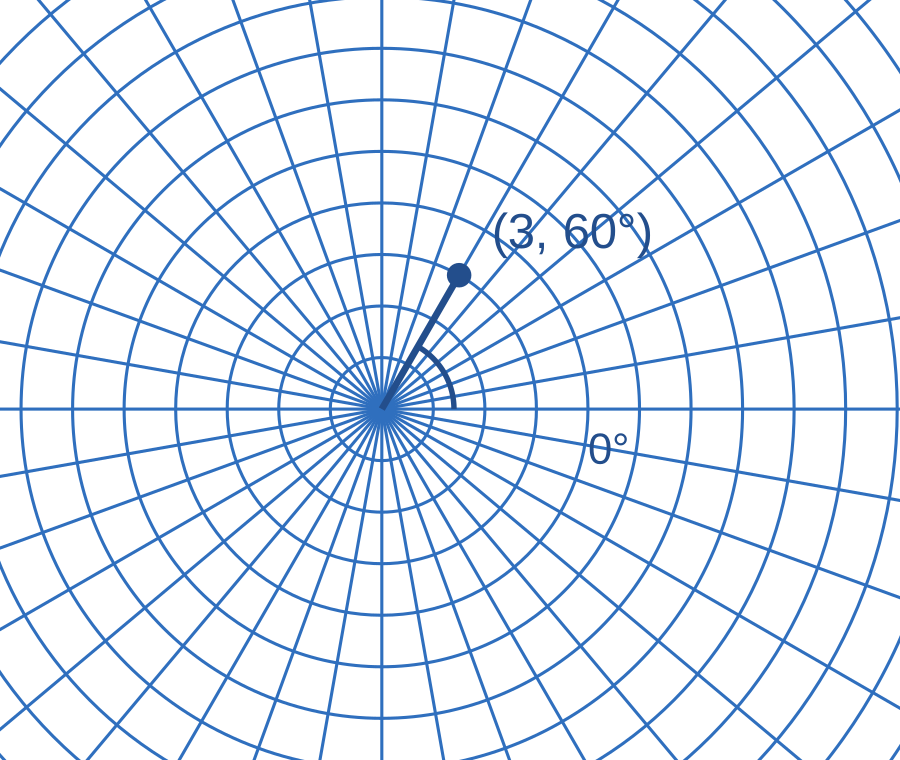
Polar grid with a blue radius and a point labeled (3, 60°)
Example in use. The example uses one ring per unit: move three rings out along the 60° ray.This is a usage illustration. Customize the sheet above before downloading.
  1. Define the radial and angle scale

    Label how much each ring represents. For this example, zero degrees points right and positive angles turn counterclockwise.

  2. Find the angle, then the radius

    Follow the 60° ray from the center and mark the third ring. Write the coordinate (3, 60°) beside the dot.

  3. Plot more points to make a pattern

    Check each radius and angle before joining points. Keep degrees and radians consistent throughout the exercise.

Try this. The ring spacing is a printed distance; the numerical radial scale is yours to choose. Record it on the sheet.

Explore more graph paper types

Questions about this printable

Can I download Polar Graph Paper as a PDF?

Yes. This page opens the graph paper generator on Polar Graph Paper, and you can download PDF, PNG, or SVG.

What is Polar Graph Paper best for?

Circular grid with radial angle lines for polar coordinates.

Use Actual Size or 100% scale in the print dialog.

Use Actual Size or 100% scale in the print dialog and match the printer paper size to the selected template.