Teacher AI tool
AI Worksheet Generator: Create Printable Worksheets from Lesson Text
How to use an AI-generated worksheetDo not upload student personal data. Source text is sent to an AI provider and generated materials should be reviewed before classroom use.
Upload .txt or .md
Difficulty
Generated worksheet
Your worksheet will appear here
Paste source material to generate a classroom-ready worksheet, quiz, and answer key.
How to use an AI-generated worksheet
Begin with source material you trust and a clear lesson goal. Review the questions and answer key before handing a worksheet to students.
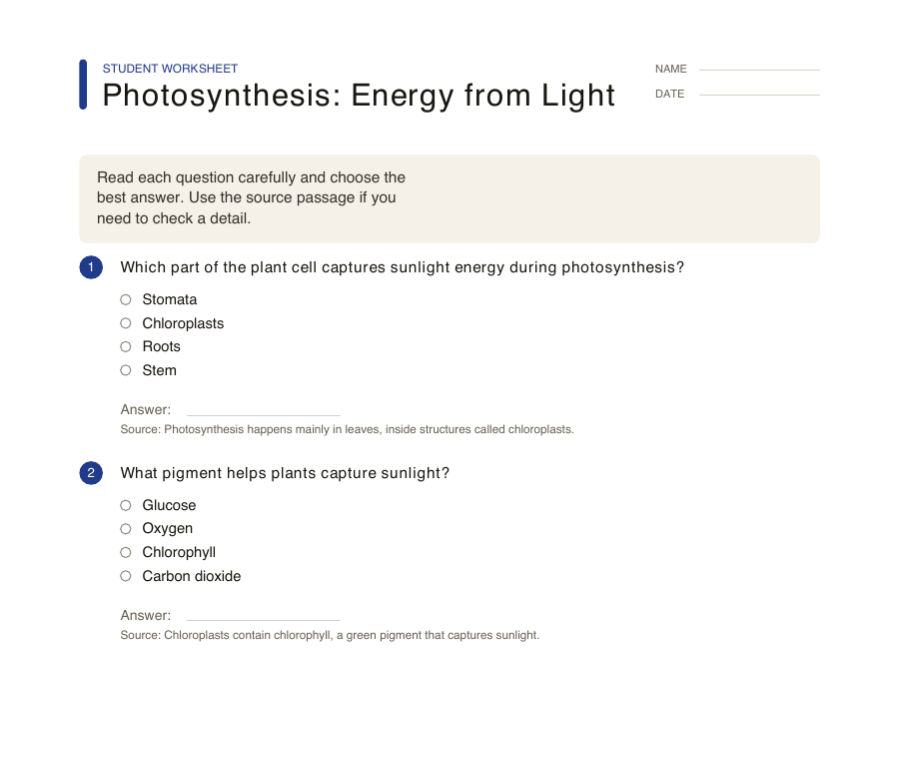
Provide a source and lesson goal
Paste the passage or notes, choose the worksheet type and grade level, and ask for a focused set of questions.
Review questions against the source
Check the wording, correct answers and explanations. Edit ambiguity or unsuitable difficulty before exporting the worksheet.
Separate student and teacher copies
Choose paper size and worksheet copies. Include answer key copies for your own use, then check the PDF before sharing.
Try this. Review is part of the workflow. AI-generated questions can need correction even when a source passage is supplied.
See more classroom worksheet toolsQuestions about this printable
Can I use text copied from a PDF?
Yes. Paste text copied from a PDF into the source box. Direct PDF upload is planned for a later phase.
Does it include an answer key?
Yes. The generator returns a student worksheet and a separate answer key.
Is the worksheet based on my source?
The prompt instructs the model to use only your source material and include references when possible.
Can I print it?
Yes. Use the print button or copy the worksheet into your preferred document editor.
Do I need student data?
No. Do not upload student personal data. Use lesson material, passages, or notes instead.
Can it make a quiz from my lesson notes?
Yes. Paste the lesson notes, choose the grade level and question type, then review the generated quiz before printing.
Can it make vocabulary worksheets?
Yes. Choose the vocabulary question type or describe the vocabulary goal in the source text so the output focuses on terms, definitions, and usage.
Teacher scenarios
Use the same source text for common worksheet jobs.
Choose the output intent before generating so the worksheet matches what teachers actually search for: a quiz, reading comprehension sheet, vocabulary practice, review packet, exit ticket, or answer key.
AI quiz generator for teachers
Create short multiple-choice, true/false, and short-answer quizzes from a passage or lesson notes.
- Best for
- End-of-lesson checks, homework review, and quick formative assessment.
- Output
- Student quiz plus a separate answer key.
Reading worksheet generator
Turn a passage into comprehension questions that ask students to recall, infer, and cite details.
- Best for
- ELA passages, science readings, social studies excerpts, and substitute plans.
- Output
- Printable reading questions with source-grounded answers.
Vocabulary worksheet generator
Extract important terms and create definition, context, and usage practice from the source.
- Best for
- New unit vocabulary, reading warmups, and subject-specific terminology.
- Output
- Vocabulary questions and an answer key.
Answer key generator
Keep the teacher copy separate from the student worksheet so printing and review stay clean.
- Best for
- Teacher packets, substitute folders, and fast grading references.
- Output
- A dedicated answer key with explanations when available.
Lesson review worksheet
Mix recall, application, and short-answer prompts to review the main ideas in one packet.
- Best for
- Unit recap days, test prep, and reteaching small groups.
- Output
- Mixed-question review sheet with editable prompts.
Exit ticket generator
Generate a small set of focused questions that can be printed or copied into the end of class.
- Best for
- Fast checks for understanding after a mini lesson.
- Output
- A short student prompt set with answers for the teacher.
Use cases
- Reading comprehension worksheets from short passages.
- Science review quizzes grounded in lesson notes.
- Vocabulary practice from classroom texts.
Teacher-ready guardrails
- Questions stay grounded in the source material.
- Answer key and source references are included.
- The output is designed for copy, review, and print workflows.
A practical teacher workflow
From lesson text to a printable worksheet
A useful AI worksheet generator should shorten preparation without hiding the decisions that matter. Start with material you already trust, describe the class context through the grade and subject controls, and treat the first draft as an editable teaching aid. Review the questions, answer key, and source references before you print. This keeps the output aligned with the lesson instead of producing a generic worksheet that only happens to use the right topic words.
- 01
Start with source material
Paste a passage, lesson notes, or a short section copied from a PDF. The source gives the generator the vocabulary, facts, and level of detail that should appear in the worksheet. Avoid student names or other personal information, and use a clean excerpt when the original document contains navigation, answer keys, or unrelated instructions.
- 02
Set the teaching brief
Choose grade level, subject, difficulty, question type, and question count. Use mixed questions for a balanced review, or choose vocabulary, multiple choice, short answer, or true/false when the class needs one focused practice mode. These choices make the printable worksheet more useful than a one-size-fits-all prompt.
- 03
Review and edit the draft
Read every prompt and answer before handing it to students. Check that questions can be answered from the source, that distractors are fair, and that the answer key matches the student version. You can edit wording, add a question, remove a weak item, or regenerate one question without throwing away the rest of the packet.
- 04
Prepare the print packet
Choose the paper size, decide how many student copies and answer keys you need, then open or download the PDF. Print one proof page at Actual Size first. Confirm that headings, answer lines, page breaks, and source references are readable before making the full classroom set.
Build the rest of the lesson packet
Use these adjacent printable tools for math practice, handwriting work, print checks, and graph-based follow-up activities.