Music paper layout finder

Blank sheet music paper: choose a printable layout

Choose a blank notation layout, inspect the full sheet, and download a Letter or A4 PDF. Start with staff paper for handwritten notes, or switch to piano, choir, percussion, guitar TAB, or chord diagrams.

How to use blank sheet music paper

Your music paper

Standard staff paper

Empty five-line staves for melodies, theory exercises, and general music lessons.

Paper size

Music Staff Paper · Letter · 1 page

Customize

Print at 100% scale. Match the paper size in your printer settings.

Preview · Letter

Open Standard staff paper

Use this sheet for

  • Melody notation
  • Theory exercises
  • General lessons

How to use blank sheet music paper

Choose a notation layout for the instrument or exercise. A melody needs a different structure from piano, guitar TAB or a multi-part vocal score.

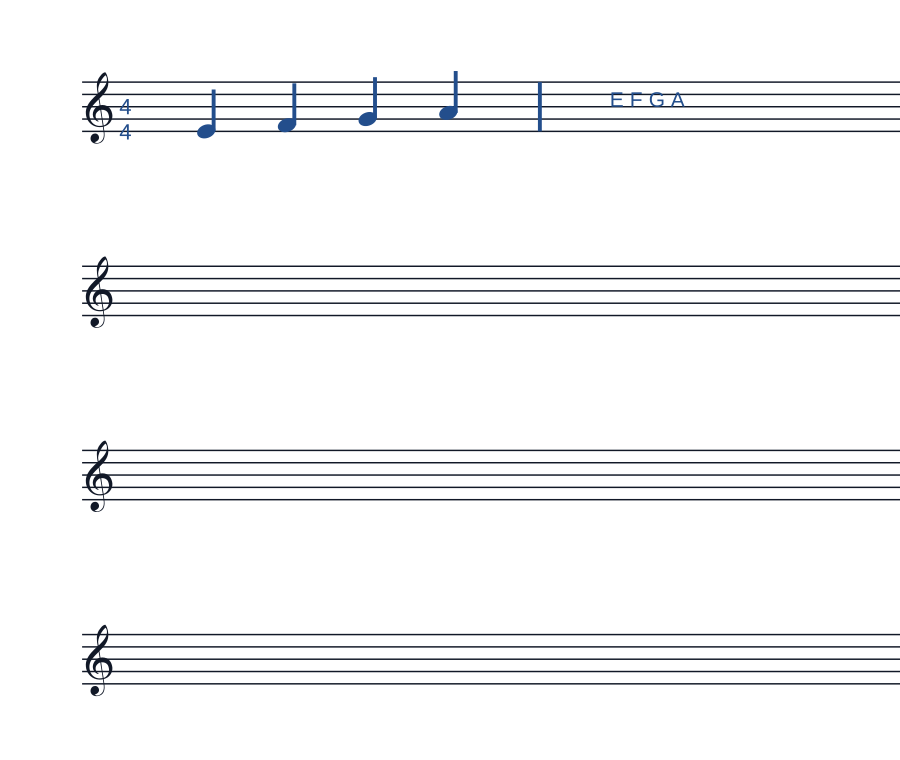
Standard staff paper with a four-four time signature, four notes and one barline
Example in use. Four quarter notes fill one bar in 4/4; letter names help check the melody.This is a usage illustration. Customize the sheet above before downloading.
  1. Choose the notation layout

    Use standard staff for a melody, grand staff for piano or TAB for fret numbers. Pick larger staves when handwriting needs more room.

  2. Set the musical context

    After printing, add the clef, key signature and time signature your piece needs. Draw barlines as you work through the rhythm.

  3. Write a short phrase and check it

    Place notes on the intended lines or spaces. Count each measure before playing or singing the phrase back.

Try this. Blank paper does not check pitches or rhythm for you. Start with a short phrase you can read back and revise.

Browse instrument-specific music paper

A guide to blank music paper

Which music paper should you print?

Blank sheet music gives you a reusable page for writing notes, rhythms, or instrument fingerings by hand. It is useful for lesson handouts, composition sketches, ear-training dictation, and practice notes. The right page depends on what you need to write and how much room you want around each example.

Standard staff paper is a practical starting point for a short melody or theory exercise. For two-hand keyboard parts, paired staves are easier to read; for guitar fingerings, a TAB sheet or chord diagram gives each string its own place.

Which music paper should you print?
LayoutWhat to choose it for
Standard staff paperUse unmarked five-line staves for melody sketches, rhythm dictation, scales, and short examples. Add your own clef, key signature, and barlines so the page suits the exercise.
Music manuscript paperChoose a denser page when a musical idea needs more staves. The closer spacing fits longer drafts, while standard staff paper leaves more room for notes between examples.
Large staff paperChoose fewer staves with wider gaps for annotations or one exercise per staff. This preset increases space between staves; use Customize if you also need more space between the five lines.
Piano grand staffUse paired treble and bass staves for keyboard parts written for both hands. Keeping the pair together makes harmony sketches and piano exercises easier to organize than separate single staves.
Percussion staff paperUse the percussion layout for drum and rhythm parts with a neutral clef. Check the preview and choose a staff-line setup in Customize that fits the instrument or exercise.
SATB vocal scoreUse four labeled parts for soprano, alto, tenor, and bass when sketching choir arrangements or four-part harmony. Keep each voice on its own staff to compare parts within a system.
Guitar TAB paperUse six-line guitar TAB to record fret numbers and string positions. It is a useful starting point for riffs and picking patterns; choose a different instrument template for another string count.
Chord chart paperUse blank chord diagrams to record finger positions and build a chord reference for a lesson or song. These boxes show fretboard shapes rather than the timing of a written melody.
Browse all music paper templates →

Letter or A4: match the paper in your printer

Letter is 8.5 × 11 inches (215.9 × 279.4 mm). A4 is 210 × 297 mm, slightly narrower and taller. Choose the size loaded in your printer before downloading; this creates a PDF at that page size rather than relying on the print dialog to resize it.

Check the preview after switching sizes. If you want a different staff spacing, margins, or notation setup, open Customize and adjust the layout in the editor before exporting.

How to print a clean practice sheet

  1. Choose the notation layout

    Check whether you need unmarked staves, a piano grand staff, a choir score, or guitar TAB. Look at the preview to confirm clefs and labels before downloading.

  2. Download the matching PDF

    Select Letter or A4 to match your printer paper, then download the PDF. Open that file in a PDF viewer and print as many copies as your lesson or notebook needs.

  3. Print at actual size

    Use 100% or Actual Size and the same page size in the print dialog. Check the printer preview for clipped edges. If your printer cannot use the current margins, increase them in Customize before exporting again.

Questions about printable music paper

Can I download blank sheet music as a free PDF?

Yes. Choose a layout and Letter or A4, then use Download PDF. Each download is one blank sheet that you can print repeatedly. No account is required for this download.

Does blank staff paper include notes or clefs?

The standard staff and manuscript layouts contain empty five-line staves for your own notation. Piano, percussion, and SATB layouts add their own clefs or part labels. Inspect the preview to choose the starting point you need.

Which layout leaves more room for handwriting?

The large staff preset uses fewer staves with more space between them. It is useful for short examples and extra annotations. To make the lines within each staff farther apart, change the staff line spacing in Customize.

Can I change the spacing or use another instrument?

Use Customize to change the selected sheet in the editor. For other instrument layouts, including bass and ukulele TAB, browse the music paper collection. Choose a template that matches the number of strings or parts you need.